
GDAL2Tiles is a command line tool that allows easy publishing of raster maps on the Internet. The raster image is converted into a directory structure of small tiles which you can copy to your webserver. GDAL2Tiles is included in GDAL/OGR 1.5.0 release.
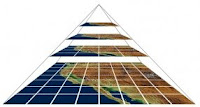 GDAL2Tiles is compatible with the Tile Map Service (TMS) Specification. TMS has been proposed as a standardised way in which map tiles are requested by clients and how servers describe their holdings. TMS is not an "official standard" and is currently managed by the Open Source Geospatial Foundation (OSGeo). The specification is based on multi-resolution image pyramids. Tile maps are composed of a set of scale-appropriate cartographic renderings, each divided up into regularly spaced image tiles.
If the supplied raster map uses EPSG:4326 projection, GDAL2Tiles also generates necessary metadata for Google Earth (KML SuperOverlay).
When the user is zooming or panning tile maps, only the tiles not currently in memory are requested from the TMS server. No special server software is needed if all map tiles are pregenerated.
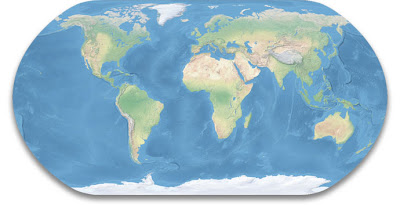
I’m here showing how you can use GDAL2Tiles to generate map tiles of Tom Patterson’s Natural Earth II. This is a beautiful raster map that portrays the world environment in an idealised manner with little human influence. The map can be downloaded on this page. I’m here using version 2C.
 I start by using gdal_translate to georeference the map image:
The image should now have the correct projection (EPSG:4326), but GDAL2Tiles was not generating the KML SuperOverlay before ran this command:
The original raster map is 16,200 x 8,100 pixels. Each map tile image is 256 x 256 pixels. This table shows the number of tiles generated for each zoom level:
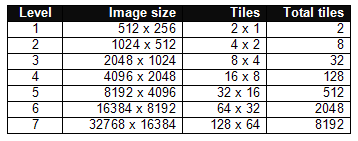 For my purpose, 5 zoom levels are enough. I therefore reduced the map image to 8192 x 4096 pixels:
Finally, I used GDAL2Tiles to generate the map tiles:
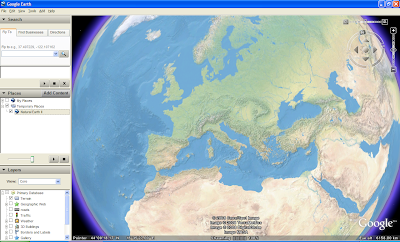
See the result as a KML SuperOverlay in Google Earth or in Open Layers. There seems to be a problem that OpenLayers can’t georeference TMS map tiles. It is therefore difficult to combine a map tile layer with other map layers.
UPDATE 2 APRIL 2008: The OpenLayers example above is now working properly thanks to Christopher Schmidt.
 GDAL2Tiles is compatible with the Tile Map Service (TMS) Specification. TMS has been proposed as a standardised way in which map tiles are requested by clients and how servers describe their holdings. TMS is not an "official standard" and is currently managed by the Open Source Geospatial Foundation (OSGeo). The specification is based on multi-resolution image pyramids. Tile maps are composed of a set of scale-appropriate cartographic renderings, each divided up into regularly spaced image tiles.
If the supplied raster map uses EPSG:4326 projection, GDAL2Tiles also generates necessary metadata for Google Earth (KML SuperOverlay).
When the user is zooming or panning tile maps, only the tiles not currently in memory are requested from the TMS server. No special server software is needed if all map tiles are pregenerated.
I’m here showing how you can use GDAL2Tiles to generate map tiles of Tom Patterson’s Natural Earth II. This is a beautiful raster map that portrays the world environment in an idealised manner with little human influence. The map can be downloaded on this page. I’m here using version 2C.
 I start by using gdal_translate to georeference the map image:
gdal_translate -a_srs EPSG:4326 -gcp 0 0 -180 90 -gcp 16200 0 180 90 -gcp 16200 8100 180 -90 NE2_modis3.jpg NE2_modis3.tif
The image should now have the correct projection (EPSG:4326), but GDAL2Tiles was not generating the KML SuperOverlay before ran this command:
gdalwarp -t_srs EPSG:4326 NE2_modis3.tif NE2_modis3_4326.tif
The original raster map is 16,200 x 8,100 pixels. Each map tile image is 256 x 256 pixels. This table shows the number of tiles generated for each zoom level:
 For my purpose, 5 zoom levels are enough. I therefore reduced the map image to 8192 x 4096 pixels:
gdal_translate -outsize 8192 4096 NE2_modis3_4326.tif NE2_modis3_4326_5.tif
Finally, I used GDAL2Tiles to generate the map tiles:
gdal2tiles -title "Natural Earth II" -publishurl http://www.thematicmapping.org/maptiles/ -v NE2_modis3_4326_5.tif naturalearth
See the result as a KML SuperOverlay in Google Earth or in Open Layers. There seems to be a problem that OpenLayers can’t georeference TMS map tiles. It is therefore difficult to combine a map tile layer with other map layers.

UPDATE 2 APRIL 2008: The OpenLayers example above is now working properly thanks to Christopher Schmidt.
Comments
May you show me the way how to use/implement this tiles cache with WMS-servers. Maybe WMS-C server?
My goal is to publish WMS-service, based on the tilecache. And I want to connect to this WMS-service from ArcGIS. (instead of using ArcGIS Image Server)
I have MapServer installed on my computer, but i don't know what to do. Pure WMS-service is render new images, but i want to use tilecache.
I am newbie in OGS, so I need a tutorial.
Thank you.
I have so far no experience with WMS tile caching, so you have to search the web to find a solution.
File "../gdal/gdal2tiles.py", line 128, in ?
import gdal
ImportError: No module named gdal
How can I get or install the module gdal, I cannot find such a module in the FWtools or in the gdal build directory?
Thanks.
I got some error. error message is about the gdal 1.6 + requirement. But I don't know How to upgrade.
Please teach me
The tutorial written on this blog is not anymore valid because there is a new version of GDAL2Tiles. For similar results you should use the "Image Based Tiles" in the GUI or "-p raster" option for the gdal2tiles.
MapTiler/GDAL2Tiles also supports the world file which is available for the NaturalWorld dataset so you don't need to do the preprocessing with gdal_translate...
Details at the OSGeo4W homepage or at http://help.maptiler.org/betatest/
Here is the step by step guide for GDAL2Tiles and world maps like Natural Earth updated for new version of GDAL2Tiles.
GDAL2Tiles now generates not only Google Earth KML Superoverlay, but also Google Maps/Yahoo/Microsoft/OpenStreetMap tiles for mashups...
Bjorn: It would be nice if you create a new blog post with updated description of MapTiler and GDAL2Tiles capabilities - similar like you did in this post...
(I corrected the links in this re-post)
C:\>C:\OSGeo4W\bin\ppgdal2tiles.py
'import site' failed; use -v for traceback
Traceback (most recent call last):
File "C:\OSGeo4W\bin\ppgdal2tiles.py", line 11, in ?
from osgeo import gdal
ImportError: No module named osgeo
This is eerily similar to the error I had when I had to switch from FWTools to OSGeo. Does anybody have any advice on what could be wrong?
Cheers,
Kyle
Thank you for sharing you knowledge
-gcp 0 0 -180 90 -gcp 16200 0 180 90 -gcp 16200 8100 180 -90
I read manpage unfortunately I didn't understand the meaning of it.