
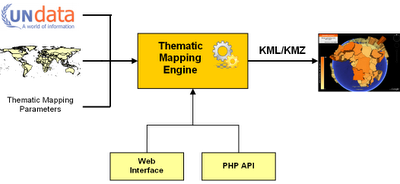
Many people have asked, - and today, I've released the source code of the Thematic Mapping Engine (TME) under a GPLv3 license. The engine takes statistical data, spatial features and thematic mapping parameters as input and returns a KMZ file. This file can be viewed in Google Earth, or other geobrowsers supporting the KML standard. TME can be accessed from a web interface or a PHP script.
TME web interface
With the TME web interface, thematic maps can be created in a web browser, without a single line of code. This is achieved through an interactive web form where the user can select between statistical indicators and various thematic mapping techniques. Mapping parameters, like the colour and size, can be readily changed. The form returns a KMZ file which can be visualised directly in the web browser using the new Google Earth plug-in, or downloaded to a computer.
TME Application Programming Interface (API)
The Thematic Mapping Engine can also be used as an application programming interface (API). This allows thematic maps to be created with a few lines of PHP code. Existing or new applications can use this API to add thematic mapping functionality. This is the code required to create a choropleth map:
Requirements
The Thematic Mapping Engine requires the following software (all are open source and available free of charge):
This PDF document (7 Mb) gives a detailed description of the Thematic Mapping Engine. The documentation is available under a Creatice Commons Attribution-Share Alike License 3.0.
You should have a basic knowledge of PHP, MySQL and JavaScript before installing the Thematic Mapping Engine.
Download the TME source code on Google Code.
Enjoy!

TME web interface
With the TME web interface, thematic maps can be created in a web browser, without a single line of code. This is achieved through an interactive web form where the user can select between statistical indicators and various thematic mapping techniques. Mapping parameters, like the colour and size, can be readily changed. The form returns a KMZ file which can be visualised directly in the web browser using the new Google Earth plug-in, or downloaded to a computer.
TME Application Programming Interface (API)
The Thematic Mapping Engine can also be used as an application programming interface (API). This allows thematic maps to be created with a few lines of PHP code. Existing or new applications can use this API to add thematic mapping functionality. This is the code required to create a choropleth map:
include ('TME_MySQL_DataConnector.php');
include ('TME_Engine.php');
$dataConnector = new DataConnector();
$dataStore = $dataConnector->getDataStore(68, 2005, 0);
$parameters = array(
'mapType' => 'choropleth',
'indicator' => 68,
'year' => 2005,
'classification' => 'equal');
$map = new ThematicMap($dataStore, $parameters);
$file = $map->getKML();
include ('TME_Engine.php');
$dataConnector = new DataConnector();
$dataStore = $dataConnector->getDataStore(68, 2005, 0);
$parameters = array(
'mapType' => 'choropleth',
'indicator' => 68,
'year' => 2005,
'classification' => 'equal');
$map = new ThematicMap($dataStore, $parameters);
$file = $map->getKML();
Requirements
The Thematic Mapping Engine requires the following software (all are open source and available free of charge):
- PHP 5
- MySQL 5+
- Apache HTTP Server
- Ext JS 2.1
- Google Earth Plug-in
This PDF document (7 Mb) gives a detailed description of the Thematic Mapping Engine. The documentation is available under a Creatice Commons Attribution-Share Alike License 3.0.
You should have a basic knowledge of PHP, MySQL and JavaScript before installing the Thematic Mapping Engine.
Download the TME source code on Google Code.
Enjoy!
Comments
Thanks for this gift :o) I will use it with my students :o)
Greetings from Africa
Henri Willox
Le Technoblog du LAC (Conakry, Guinea)
congrats.
Jo
Documentation is available from this computer. Might be a firewall issue. You can try to download from this page.
This is awesome news, thanks for doing it!
Mano
I cant believe that!!!
since first time I´v seen your engine I hope that someday I could do something cool like this for my project, its perfect!
Its wonderfull that you´ve done this!
I hope show you something soon with brazilian Aids data,
Please tell me the true your real name its Santa Claus??
I think this idea is a simple way to implement rich map designs with a few clicks on a web-browser.
Thanks for sharing!
Could you please let me know where can I find city borders ie; Polygan coordinates. I have the lat and long information for each city and I need the city border dataset.
You're better off creating your own borders as a new KML file. Depending on which country you're planning to map out there are multiple definitions of "cities" (urban extent, administrative area etc, etc.) so it could all get a bit subjective.
I'd suggest, first off, that you create a simple points file (say based on the centre of the cities) and try using the application to set up a proportional symbol map.
Have fun