
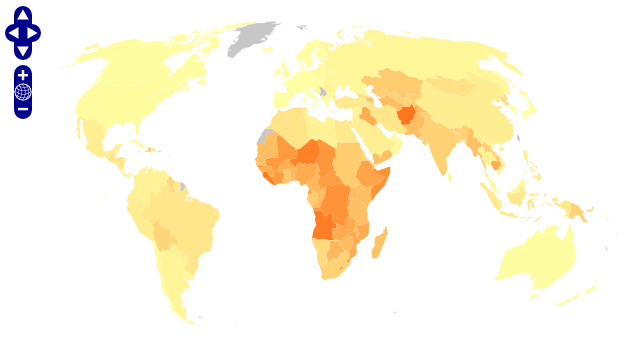
Projecting KML with OpenLayers and Proj4js


Back in May I was waiting for a geobrowser capable of showing KML in different projections. Inspired by a great blog series by Richard Marsden (1, 2, 3, 4, 5, 6 & 7!), I've done some experiments with OpenLayers and Proj4js.

Proj4js is a JavaScript library that provides methods for coordinates transformation between map projections and longitude/latitude. OpenLayers integrates with Proj4js, and by combining these libraries your able to project KML in pure JavaScript. No server side dependencies!

This example shows a KML document from the Thematic Mapping Engine in three different projections (Mollweide, Sinusoidal and Equal Area Cylindrical). The KML document contains borders, but these are not extracted and displayed by OpenLayers.

OpenLayers and Proj4js rocks! :-)

Comments

Stephan Becker said…
Hi Bjorn - I have come across your blogsite after searching about "dynamic content for Google Earth". We have just begun developping KLMs to put our 3D coral reef maps on Google Earth for educational purposes and to help preserve them. This is one of our KLMs:

http://bit.ly/EJkBb

What exactly is "thematic mapping"?

Also had a look at the tour for the schools - pretty cool!

Best, Stephan
stephanATbeautifuloceans.com
www.twitter.com/StephBeautifulO
Richard Marsden said…
Thanks for the mention!

I had to add the Cylindrical Equal Area projection to Proj4JS myself. Most of the other 'interesting' projections still need to be implemented, so the Proj4JS guys would appreciate the addition of further projections if anyone has a few hours spare time.

I also plan to write an article or two about polar projections - they'll probably be published in January.
Bjørn Sandvik said…
Stephan: This PDF from Brian McManus is about thematic mapping: http://www.pop.psu.edu/gia-core/pdfs/gis_rd_05-70.pdf

Richard: Thanks for your great contribution. I would really like to have Winkel Tripel support in Proj4js. Looking forward to your new articles about polar projections!
Nice post!

I am the developer behind wdpa-marine.org that is mention on Richards article, so this is of course really great info.

There are 2 main reasons that we had for using a cylindrical projection, well mercator are:

1) We wanted to have access to the Google Imagery so you have to use their projection.

2) Maybe I am wrong, but I havent seen a map with a non cylindrical projection where you can pan over the international date line. This is not a problem if you just want to produce a map that is like a world report. But if you expect users to pan, zoom in and get to the details then this is crucial, or browsing in the pacific ocean is not possible. So to me continuos naigation from east to south is very important when you have zoomed in a bit.

Of course you could argue that then thematic mapping is not suitable for this use case, but what we tried, and did not succeed probably ;), was to integrate thematic mapping with navigation of the areas.
Somehow I think that some thematic mapping on the web could be better displayed just as a PDF instead of a mapping solution like OpenLayers. The real challenge is to make those thematic mappings also interactive and engaging.

Probably this deserves a full post on our blog.

Javier.
Bjørn Sandvik said…
Hi Javier,

Thanks for your comment. I'm impressed by the work you've done on wdpa-marine.org. Nice design and I like the fullscreen option.

It's very hard to make 2-D interactive maps that can be panned and zoomed seamlessly without using a cylindrical projection. I'm sure this is the reason why mercator is still used by commercial map providers.

Popular posts from this blog

Creating a WebGL Earth with three.js

This blog post will show you how to create a WebGL Earth with three.js , a great JavaScript library which helps you to go 3D in the browser. I was surprised how easy it seemed when reading a blog post  by Jerome Etienne . So I decided to give it a try using earth textures  from one of my favourite cartographers, Tom Patterson . WebGL is a JavaScript API for rendering interactive 3D graphics in modern web browsers without the use of plug-ins. Three.js is built on top of WebGL, and allows you to create complex 3D scenes with a few lines of JavaScript. If your browser supports WebGL you should see a rotating Earth below: [ Fullscreen ] To be able to display something with three.js, you need three things: a scene, a camera and a renderer. var width  = window.innerWidth,     height = window.innerHeight; var scene = new THREE.Scene(); var camera = new THREE.PerspectiveCamera(45, width / height, 0.01, 1000); camera.position.z = 1.5; var rende...

Thematic Mapping Engine

It's time to introduce the Thematic Mapping Engine (TME). In my previous blog posts, I've shown various techniques of how geobrowsers can be used for thematic mapping. The goal has been to explore the possibilites and to make these techniques available to a wider audience. The Tematic Mapping Engine provides an easy-to-use web interface where you can create visually appealing maps on-the-fly. So far only prism maps are supported, but other thematic mapping techniques will be added in the upcoming weeks. The engine returns a KMZ file that you can open in Google Earth or download to your computer. My primary data source is UNdata . The above visualisation is generated by TME ( download KMZ ) and shows child mortaility in the world ( UNdata ). The Thematic Mapping Engine is also an example of what you can achieve with open source tools and datasets in the public domain: A world border dataset is loaded into a MySQL database . The same database contains tables with statistics ...

Creating 3D terrains with Cesium

Previously, I’ve used three.js to create 3D terrain maps in the browser ( 1 , 2 , 3 , 4 , 5 , 6 ). It worked great for smaller areas, but three.js doesn’t have built-in support for tiling and advanced LOD algorithms needed to render large terrains. So I decided to take Cesium for a spin. Cesium is a JavaScript library for creating 3D globes and 2D maps in the browser without a plugin. Like three.js, it uses WebGL for hardware-accelerated graphics. Cesium allows you to add your own terrain data, and this blog post will show you how. Impressed by the terrain rendering in @CesiumJS - with a 10m elevation model for Norway! Farewell Google Earth. pic.twitter.com/RQKvfu2hBb — Bjørn Sandvik (@thematicmapping) October 4, 2014 Compared to  the dying Google Earth plugin , it's quite complicated to get started with Cesium. The source code is well documented and the live coding Sandcastle is great, but there is a lack of tutorials  and my development slows down when ...