
I would argue that KML and Google Earth supports reference maps (geographic features) much better than thematic maps (spatial patterns of a theme). Still, there are some workarounds, and this week I want to show three different ways of making proportional symbols in KML: icons, regular polygons and collada models.
In this post, I want to focus on how to make proportional circles using the KML Icon element. This is the easiest and most efficient way to make proportional symbols.
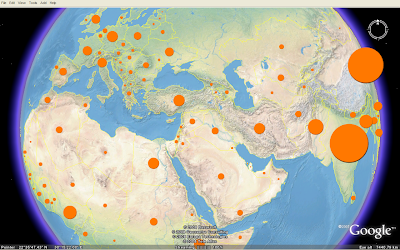 This map shows the population in each country of the world in 2005 (source: UNdata). See this blog post for information about symbol placement and how they are mathematically scaled.
A KML icon has to be an image. I hope vector support will be added in the next major KML version. A circle can be drawn using one line of SVG, and I think KML should support such basic shapes. Still, KML has powerful ways of styling icon images, and I've used these elements to create proportional symbols.
I've made one icon for the proportional symbols map. The icon is a white circle on a transparent background saved as a PNG file (200 x 200 px). The icon size has to be bigger than "normal" icons since it will be scaled proportional to an attribute value. The icons are colourised and scaled using IconStyle elements. Only one image is thereby needed to make circle symbols in different colours and sizes. The KMZ file containing KML and the image is only 19 kB.
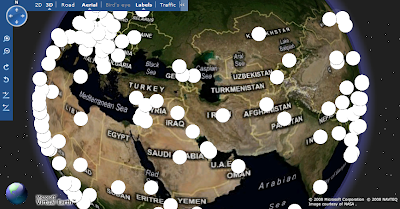
The drawback is that the map is only viewable in Google Earth (so far). This is how it looks in Google Maps and Microsoft Live Maps (Virtual Earth). The icons are not colourised or scaled.
In this post, I want to focus on how to make proportional circles using the KML Icon element. This is the easiest and most efficient way to make proportional symbols.
This map shows the population in each country of the world in 2005 (source: UNdata). See this blog post for information about symbol placement and how they are mathematically scaled.A KML icon has to be an image. I hope vector support will be added in the next major KML version. A circle can be drawn using one line of SVG, and I think KML should support such basic shapes. Still, KML has powerful ways of styling icon images, and I've used these elements to create proportional symbols.
I've made one icon for the proportional symbols map. The icon is a white circle on a transparent background saved as a PNG file (200 x 200 px). The icon size has to be bigger than "normal" icons since it will be scaled proportional to an attribute value. The icons are colourised and scaled using IconStyle elements. Only one image is thereby needed to make circle symbols in different colours and sizes. The KMZ file containing KML and the image is only 19 kB.

The drawback is that the map is only viewable in Google Earth (so far). This is how it looks in Google Maps and Microsoft Live Maps (Virtual Earth). The icons are not colourised or scaled.

Comments
could you please explain where you got the landscapes overlay for GE shown in the first picture?
now I see: It's Natural Earth II. OK, but you have a broken link or missing PNG over Western Europe.
Thanks, Lars
Yes, it's Natural Earth II from this blog post. I'm working on my own basemap for thematic maps, as I find the Google Earth satellite imagery too "cluttered". All tiles seems to load here, please send me a screenshot: bjorn@thematicmapping.org
The concept should work in Google maps if you include the styling "inline" with the placemarks, instead of as a reference to an included global or external style file. Of course your KML will get bigger as a result, but at least the styling should work.
Google Maps needs to have the style specified in each placemark definition, while Google Earth can do either in0line or global styles.